For listing photographers & agents

Stage the whole listing.
Get it back MLS-ready.

Upload every photo once. Empty rooms virtually staged, every photo enhanced, every altered image labelled and paired with its unaltered original, a hosted disclosure page with QR code, and one ZIP in MLS upload order. About five minutes. $33 per listing. No subscription.

Real pipeline output, unretouched Originals paired for CRMLS 11.5.2 / AB 723 Disclosure page + QR included One-time charge, no subscription
A real listing set

Vacant apartment in. Staged, labelled, paired set out.

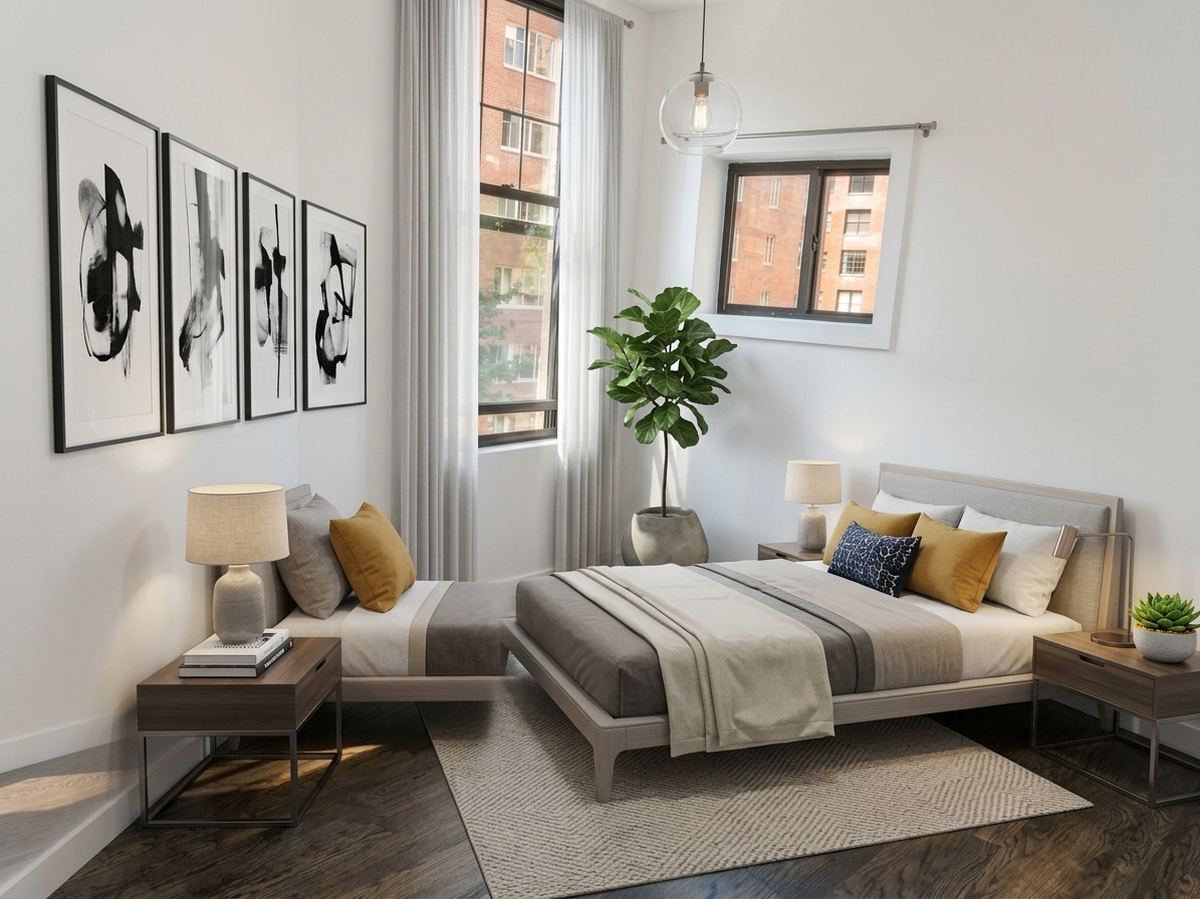
These are straight out of the pipeline from a ten-photo upload — no hand retouching. Left is the original the buyer can always see; right is what goes on the MLS with its label.

Empty living room with exposed brick, original photo
Original — unalteredphoto_02_original.jpg
Same living room virtually staged with sofa, rug and plants
Virtually staged — labelledphoto_01_staging.jpg
Empty bedroom with corner windows, original photo
Original — unalteredphoto_04_original.jpg
Same bedroom virtually staged with bed, art and plant
Virtually staged — labelledphoto_03_staging.jpg
Empty open-plan kitchen, original photo
Original — unalteredphoto_06_original.jpg
Same kitchen virtually staged with dining table and decor
Virtually staged — labelledphoto_05_staging.jpg
Empty entry hall, original photo
Original — unalteredphoto_08_original.jpg
Same entry hall virtually staged with console and art
Virtually staged — labelledphoto_07_staging.jpg
Empty living room with balcony, original photo
Original — unalteredphoto_10_original.jpg
Same living room virtually staged with sofa, chairs and TV
Virtually staged — labelledphoto_09_staging.jpg

Source photos are CC-licensed vacant-apartment photos from Wikimedia Commons, run through the pipeline on 2026-09-11 with the default modern style. Walls, windows, floors and fixtures are not moved; furniture is added to scale.

What you download

One ZIP, already in MLS order.

Every altered image is followed by its original, the label is in the filename, and a description sheet gives you the line to paste into each photo's MLS description field.

mls-ready-118-maple-ave.zip
├─ photo_01_staging.jpg ← virtually staged, labelled
├─ photo_02_original.jpg ← its unaltered original, right after
├─ photo_03_staging.jpg
├─ photo_04_original.jpg
├─ photo_05.jpg ← enhanced only (exposure/color), no disclosure needed
├─ …
├─ photo-descriptions.csv ← paste-ready MLS photo descriptions
└─ README.txt ← disclosure page URL + upload order
  • Virtual staging for every room the classifier reads as empty (living, bedroom, kitchen, dining, hallway). Furnished rooms are enhanced, not staged.
  • Enhancement on every photo: exposure, white balance, color, straightening — the edits every MLS treats as exempt.
  • Label + pairing done: “Virtually staged — digitally altered image. Unaltered original is the next photo.”
  • Hosted disclosure page + QR at buildmylisting.com/originals/… — public, no login, every altered photo beside its original.
  • Originals kept as the compliance record; you get them back untouched at full resolution.
How it works

Upload once. About five minutes. Download.

1

Pay $33, drop the photos

Up to 50 photos per listing. Add the address and basics so the set is named for the property. No account setup first — Stripe collects your email and the listing is waiting when you land back.

2

We classify, enhance, stage

Each photo is classified by room and state, enhanced, and — if the room is empty — virtually staged in the style you pick (modern by default). Every alteration is logged for the disclosure page.

3

Download the MLS-ready ZIP

Ordered, labelled, paired. Paste the descriptions, upload in order, drop the QR on the flyer. Done.

Why the pairing matters now

Altered listing photos now need a label and the original — by law in California, by rule almost everywhere.

Photographers and agents are being asked to deliver sets that already comply. This is what the set is built around.

California AB 723 (in force since Jan 1, 2026)

Business & Professions Code §10140.8: a conspicuous disclosure on any digitally altered listing image, and the unaltered image included wherever it is posted online. Applies to brokers, salespersons and anyone acting for them.

CRMLS Rule 11.5.2

Label the altered photo (“digitally altered”, “virtually staged”) in the photo description and place the original immediately before or after it. Warning first, then a $250 fine.

SDMLS, Bright, Stellar, NTREIS, NorthstarMLS

Label-plus-original rules of the same shape; SDMLS states a label alone is insufficient. NAR Articles 2 and 12 apply nationwide.

Coming: Wisconsin Act 69 (2027), bills in NY, TX, FL, IL

The pairing habit travels. A set that already carries labels and originals is compliant on day one wherever the rule lands.

BuildMyListing automates the disclosure artifact. It is not legal advice and does not replace your own or your MLS's requirements — check whether your board also wants an on-image watermark.

Per listing
$33
one listing, one-time — no subscription, no minimum
  • Up to 50 photos, every one enhanced
  • Virtual staging for every empty room
  • Labelled + paired set in MLS order, one ZIP
  • Paste-ready photo descriptions
  • Hosted disclosure page + QR
  • Originals returned untouched
Stage a listing — $33

Shoot more than a few listings a month? Reply to your receipt — volume pricing for photographers is next.

Straight answers on limits. Altered images are delivered at 1200px on the long side today (originals come back at full resolution). No on-image watermark is burned in — the label lives in the filename, the description sheet and the disclosure page; add your MLS's watermark if it requires one. One staging style per listing run. If a room comes back wrong, re-stage it from the listing page.
Questions

Before you upload

Does the ZIP really pair each staged photo with its original?

Yes. Every disclosure-required image is followed immediately by its unaltered original, with the label in the filename and a paste-ready line in photo-descriptions.csv. That is the CRMLS 11.5.2 / AB 723 pattern; most other boards' rules have the same shape.

What counts as “altered” versus “enhanced”?

Staging, decluttering, sky replacement and object removal are altered (disclosure required). Exposure, white balance, color correction, straightening, cropping and sharpening are enhancements (exempt). The pipeline logs which is which per photo.

Do I need an account?

No. Pay, upload, download. Stripe collects your email and the listing is attached to it so you can come back to the disclosure page and re-download.

Which rooms get staged?

Any photo classified as an empty room. Furnished rooms and exteriors are enhanced only. You can re-stage an individual photo in a different style from the listing page.

Is this legal advice? Does it make me compliant?

No, and only partly. It produces the artifact the rules ask for — label, paired original, public disclosure page. Your MLS may add requirements (on-image watermark, remarks text). Check your board.

What if the staging is bad?

Re-stage the room from the listing page. If a set is unusable, reply to your receipt and we refund the listing.